
Custom dashboards and client portals for growing businesses
Client details in one app, payments in a spreadsheet, tasks in a group chat, and nobody sure what's due this week.
We build one private dashboard where your team sees clients, projects, payments and tasks, with the right access for each person. Optional client portals let your customers check their status without calling you.
Part of our custom systems service.

A business dashboard, in short
A custom dashboard is private business software for your team: client records, projects, tasks, invoices and payments in one place, with reports at a glance. A client portal is the customer-facing side, where clients check progress, see what they owe or sign without needing to message you.
- Common modules
- Clients, pipeline, projects and tasks, invoices and payments, expenses, reports.
- Access
- Separate logins and permissions for owners, managers and staff.
- Works on
- Phones, tablets and computers, in any browser.
Why not just use a ready-made CRM?
Big CRMs are built for every business, which means you pay for dozens of features you don't use and still bend your process to fit theirs.
A custom dashboard shows only what your team needs, uses your words for your stages, and connects to your website forms, bookings and payments directly.
- Every client and project in one place
- Clear stages from inquiry to paid
- Invoices, payments and balances tracked
- Tasks and alerts for each staff member
- Reports without building spreadsheets
Our dashboard and CRM development services
Pick the modules you need now. Add more later. Each one is designed around your business, not a template.
Clients and pipeline
Every inquiry becomes a client file that moves through your stages.
- Client records
- Drag-and-drop stages
- Notes and history
Projects and tasks
Jobs, events or projects with tasks, owners and due dates.
- Task boards
- Assigned staff
- Due date alerts
Invoices and payments
Create invoices, record payments and see who still owes what.
- Invoice generator
- Payment tracking
- Balance reports
Client portal
Customers check their status, see what they owe or sign documents with a secure link.
- Status tracking
- Payment details and balances
- Contract signing
Expenses and reports
Money in and money out, with simple reports you can export.
- Expense log
- Monthly summaries
- CSV export
Team access and security
Logins for every staff member with the right permissions.
- Roles and permissions
- Lockout protection
- Backups
Still running the business on spreadsheets?
Show us how you work today. We'll sketch the dashboard you need, free.
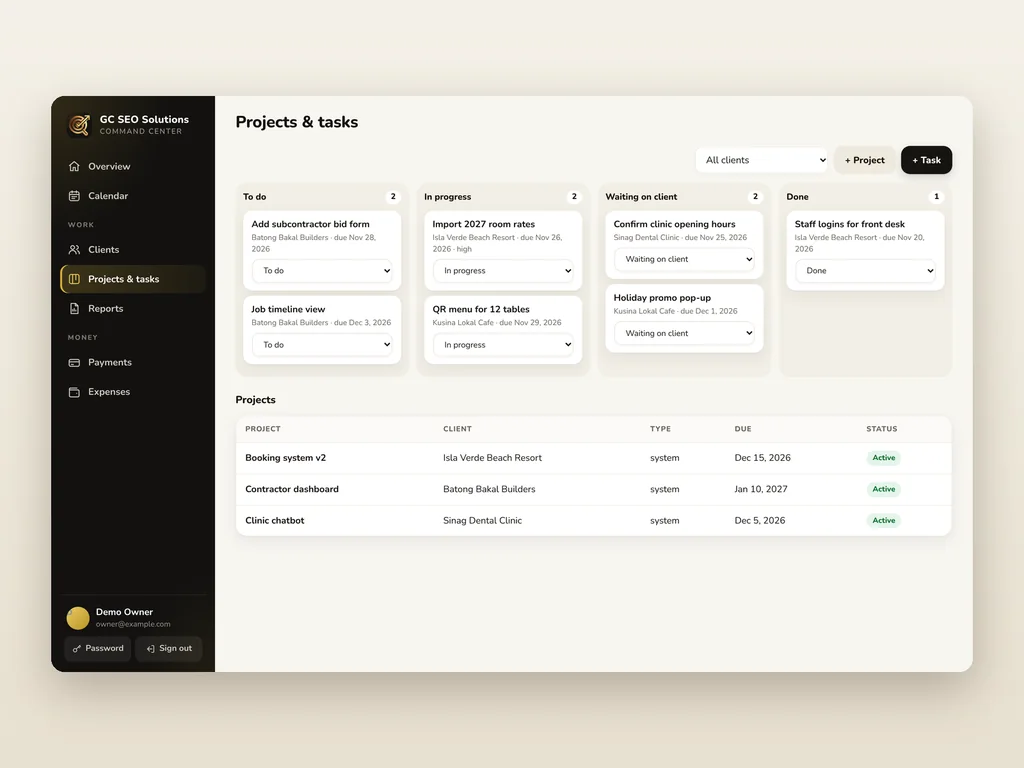
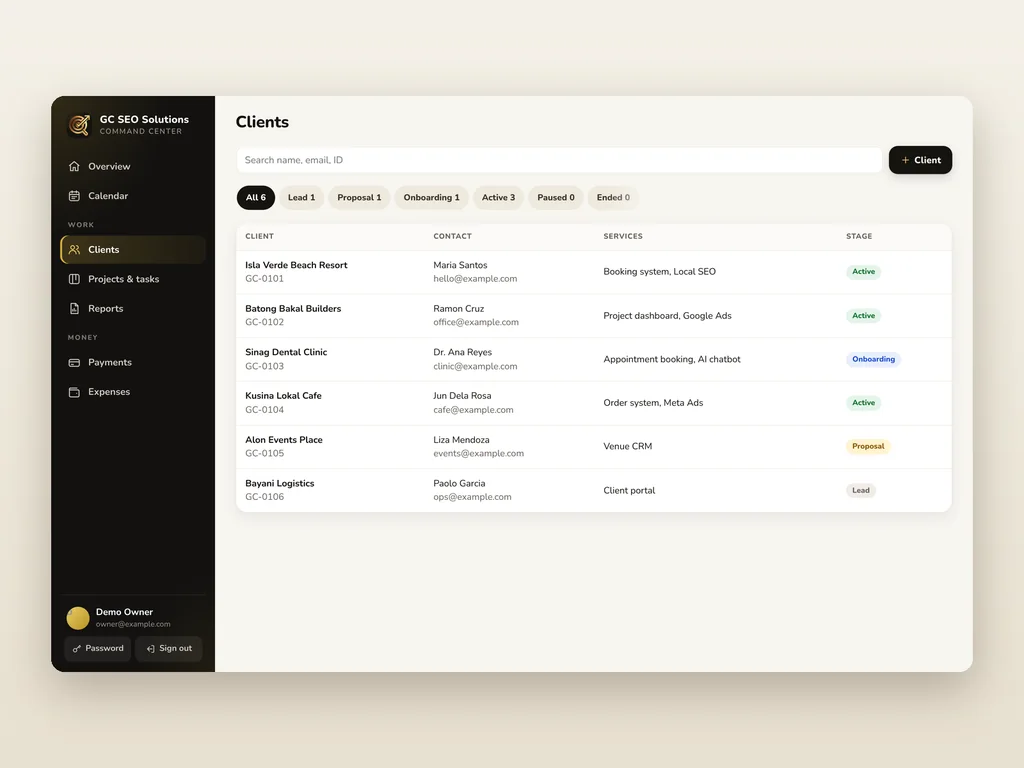
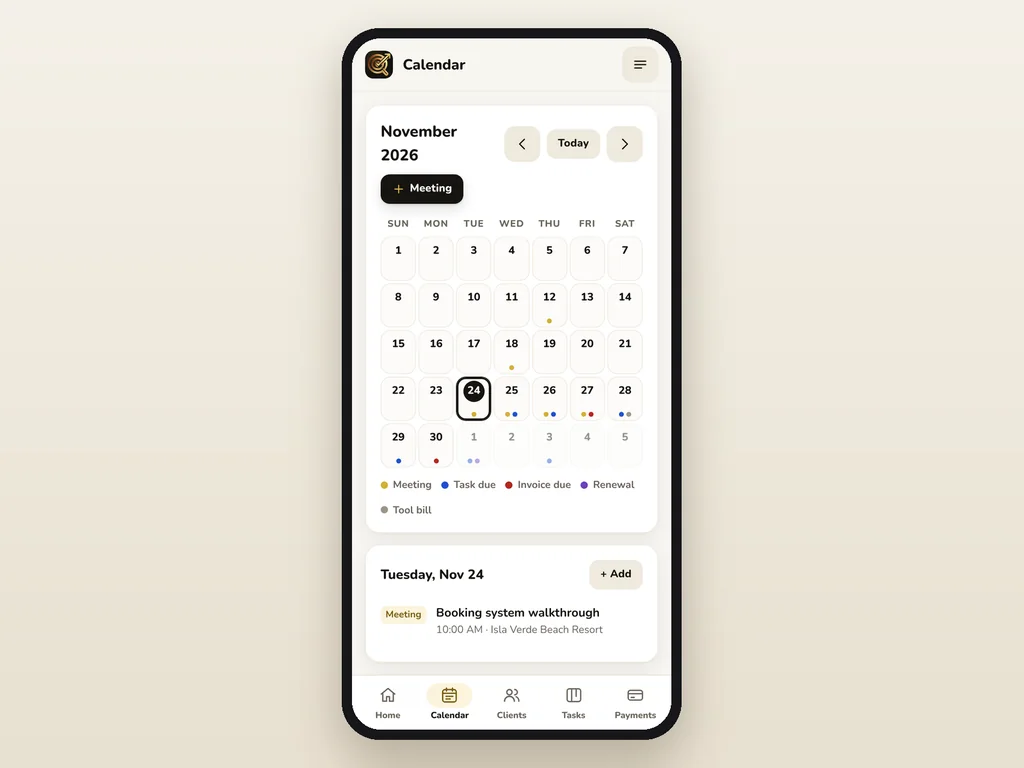
Inside a dashboard we built
Screens from the system our own agency runs on. Every name and figure here is example data.
Custom CRM development vs ready-made CRM software
A CRM (customer relationship management) system keeps your customer records, sales pipeline and follow-ups in one place. Ready-made CRM software works well for many teams, especially sales teams with a standard process.
It gets expensive or awkward when you pay per user every month, when half the features don't apply to you, or when your process doesn't fit their stages. A resort, a construction company and a dental clinic all track customers differently.
A custom CRM is built around how you work and your requirements: your stages, your fields, your reports, and the right access for each person on your team. No per-seat fees, and it connects to your booking page, invoices and website forms.
Not sure which way to go? We'll tell you honestly. If a ready-made CRM fits your business better, we'll say so.
How a custom dashboard improves daily operations
Less copy and paste
Inquiries from your website and chat go straight into the dashboard, so nobody retypes customer details.
Better follow-ups
Every lead has an owner, a stage and a next step, so fewer sales slip through the cracks.
Clear numbers
Revenue, unpaid invoices and open tasks on one screen, instead of three spreadsheets.
A better client experience
With a client portal, customers check their status and documents without calling you.
Dashboards we have already built
We run our own agency on one.
GC Command Center (our own)
- Clients, meetings and projects
- Invoices, retainers and payments
- Expenses and reports
- Installable on phone, secure sign-in
Resort staff dashboard
- Bookings calendar and list
- Payment status per booking
- Staff accounts on phones
Event venue CRM (working demo)
- Inquiry-to-booking pipeline
- Contract signing flow
- Crew shifts and timesheets
How we build your dashboard
Start small, grow with your team. The same small development team stays on your project from design to support.
Free consultation
How your team works now and where things fall through.
Map the modules
Screens, stages and roles agreed in writing.
Design
Clean screens that work on phones and computers.
Build and import
Built securely, with your existing data imported.
Train your team
Logins set up, phones installed, team walked through.
Support and add
Fixes and new modules delivered as you grow.
Who custom dashboards are for
Teams that juggle many clients, jobs or payments.
- Agencies, consultants and professional service firms
- Resorts, venues and event businesses
- Contractors, builders and construction companies
- Shipping, logistics and trucking companies
- Clinics, dental offices and studios with recurring clients
- Schools, review centers and training centers
- Distributors, retailers and multi-branch businesses
- Any team running on spreadsheets and chats
Why build your dashboard with us
We use our own
Our agency runs on a dashboard we built.
Your process, your words
Stages and screens that match how you work.
Secure by default
Roles, lockout protection and backups included.
No per-seat fees
Add staff without paying per user.
Frequently asked questions
How much does a custom dashboard cost?
It depends on the modules, roles and connections you need. Start small with the modules that matter most; we price each phase separately after a free call.
Do I pay per user?
No. Unlike many CRMs, our dashboards don't charge per seat. You pay for the build and optional support.
Can you import our existing spreadsheets?
Yes. We import clients, bookings and payment records from spreadsheets so you start with your real data.
Can clients log in too?
Yes, through a client portal. Many clients prefer a secure link or client code to check status, see what they owe or sign, without creating an account.
Can you build a CRM for my industry?
Yes. We have built tools for resorts, event venues and our own agency, and we design each one around how your industry works: quotes and progress billing for contractors, enrollment for schools, appointments for clinics. You tell us your requirements; we turn them into simple screens.
Where is the data stored?
In a secure cloud account set up in your name, with backups. You can export your data at any time.
Ready to see everything in one place?
Book a free consultation. We'll sketch the dashboard your team needs.